
My Disney Experience
DisneyTravel & Local
4.539.65K Reviews
- Version
- 8.26.1
- Installs
- 10.00M
- Age Rating
- Everyone
Screenshots
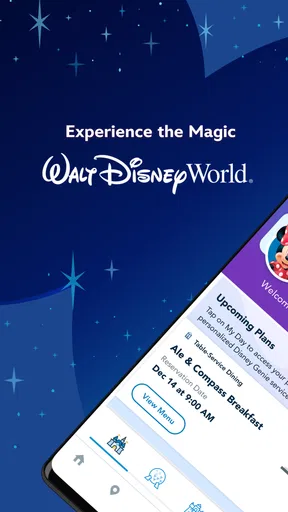
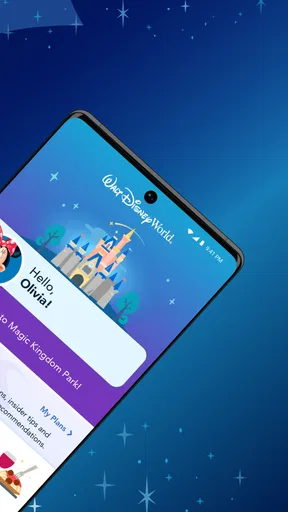
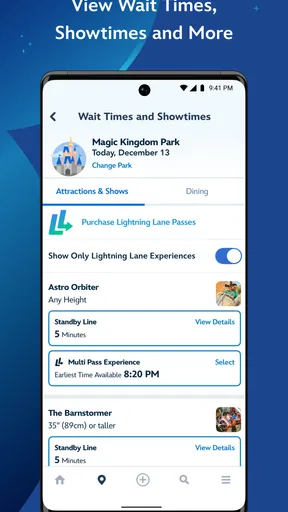
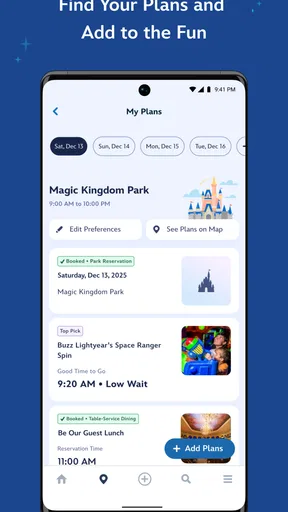
Our Review of My Disney Experience
 Analysis by Appyee
Planning a Walt Disney World visit can feel like managing several moving parts at once: park maps, attraction queues, dining plans, tickets, and the simple question of where everyone is right now. My Disney Experience brings those tasks into one travel and local app instead of making me jump between a map, a browser, and paper notes. I found it most useful as a companion during the trip itself, when plans change quickly and walking across a park to check something in person is a poor use of time.
The app is free, made by Disney, and aimed at Everyone. It has been available since January 31, 2018, and its current version is 8.24. That history matters because this is not a small map utility; it has become a central digital tool for visitors who want to organize a Walt Disney World Resort day from a phone. It has earned a 4.5 average from around 165 thousand ratings and has passed 10 million installs, so it is clearly familiar to a large audience.
How My Disney Experience feels in current use
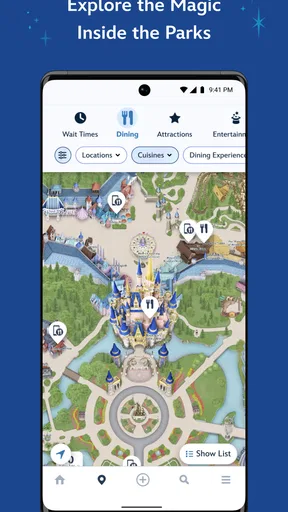
My first impression is that the app makes the most sense when I treat it as a live trip dashboard rather than a one-time planning tool. The map helps me understand where attractions, dining locations, shops, and other points of interest sit in relation to one another. That sounds basic, but it becomes valuable when a family is deciding whether to wait nearby, cross the park, or postpone an activity until later.
The strongest part of the experience is the connection between location information and practical decisions. A map alone tells me where something is. A queue view gives me a reason to choose one attraction over another. Dining information adds another layer, because a restaurant that looks close on the map may not fit comfortably between two reservations or scheduled activities. The app encourages me to plan with the park as it actually is, not as I imagined it before arriving.
I would not rely on it as my only source of orientation on a first visit. A phone screen can be difficult to read in bright sunlight, and a group may not want to stop every few minutes to check it. I still prefer agreeing on a broad route before entering an area. The app then handles the details, especially when a queue changes or somebody in the group wants to adjust the next stop.
Useful before leaving home
Before a trip, I would use the app to become familiar with the resort layout and identify the attractions or dining locations that matter most to my group. This is more helpful than building an overpacked timetable. Instead, I can create a short priority list, notice which activities are near each other, and leave room for slower moments. That approach reduces the temptation to spend the entire day rushing between distant parts of a park.
The ticket-related tools also make the app more relevant before arrival. I can use the same Disney-focused environment for trip preparation rather than keeping ticket details in one place and park information somewhere else. For a group, this reduces the chance that one person becomes the only keeper of every important detail. I still recommend checking the information carefully before finalizing plans, because an app can organize choices but cannot decide whether a particular schedule suits children, older relatives, or a group with accessibility needs.
A useful planning habit is to save the map for decision-making, not decoration. I look at the area around a high-priority attraction and mark nearby alternatives. If the main choice is busy, the backup should be close enough to keep the day moving. This is a small change from simply listing attractions, but it makes the app more valuable when the real day refuses to follow the original plan.
What the live tools change during a park day
Wait-time information is where the app earns its place on my phone. Without it, I have to walk toward an attraction before learning whether the queue fits my schedule. With it, I can compare options from where I am and make a more informed choice. The benefit is not only saving steps. It also helps me avoid wasting a comfortable break by sending everyone toward a queue that has suddenly become impractical.
I found the map and wait information most effective when used together. A short queue on the opposite side of a park is not automatically better than a longer queue nearby. The walking time, the group’s energy, and the next meal all matter. My Disney Experience gives me the information needed for that trade-off, but I still have to apply common sense. Live figures can change while I am walking, so I treat them as guidance rather than a promise.
That distinction is important for families. A parent may see an attractive wait time, while a tired child sees another long walk. The app supports the decision, but it does not replace reading the mood of the group. In my experience, the best use is to check it at natural pauses: after leaving an attraction, while sitting down for food, or when the group is already discussing what to do next.
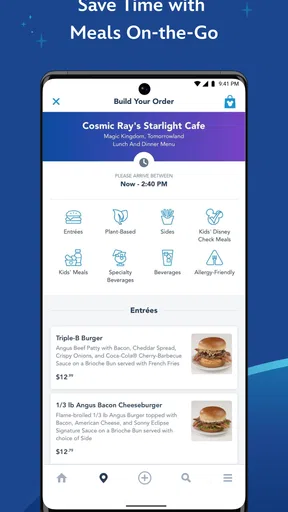
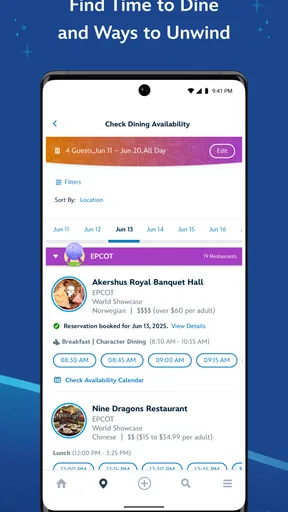
Dining information is similarly useful when handled as part of a route. I can look for a place that fits the current location instead of choosing a restaurant in isolation. This helps when weather, fatigue, or an unexpected delay changes the day. I would still confirm the details that matter to my party before depending on a dining plan, particularly if someone has dietary restrictions or the group needs a specific type of seating.
A realistic day with the app
Imagine arriving with two adults and children who each have different priorities. The morning plan includes a popular attraction, a meal later in the day, and several flexible stops. Rather than opening the app only once, I would use it in short bursts. First, I would check the map and confirm the route. After the first attraction, I would compare nearby wait times instead of automatically returning to the original schedule. Before lunch, I would use the dining information to choose a practical option close to the group’s current position.
Later, if the children are tired, the app can help me stop optimizing every minute. I might choose a nearby activity with a reasonable queue rather than chasing the lowest number across the resort. That is one of the less obvious strengths of a connected park app: it gives me enough information to make a calmer decision. The goal is not to turn a holiday into a spreadsheet. The goal is to reduce avoidable uncertainty.
For a larger group, I would nominate one person to handle active planning while sharing the decisions aloud. Passing one phone around can slow everyone down, and several people changing plans at once can create confusion. The app is most effective when it supports a simple group agreement: one person checks, everyone discusses, and the group chooses.
How the product has developed
Since its release in 2018, the app has had time to grow from a resort companion into a broader planning and in-park utility. Its current version, 8.24, shows that Disney continues to maintain the product rather than leaving it as a static map. I see that evolution in the way the app brings together several parts of the visit: tickets, attraction information, dining, maps, and live planning.
I would be careful about interpreting a version number as a guarantee of a particular new feature or a completely redesigned experience. A current release tells me that the app is being updated, but it does not mean every element will feel new to an existing user. In practice, the important question is whether the current build makes the everyday tasks of checking, navigating, and adjusting plans easier. For me, the value is cumulative: each connected tool is more useful because it sits beside the others.
Existing users should expect the overall purpose to remain familiar. The app is still centered on the Walt Disney World Resort experience, not on general travel planning. That focus is a strength if Disney is the destination, but it also explains why the app may feel excessive for someone who only wants a simple route map or a general Orlando guide.
What existing users gain and what still takes patience
Someone returning to the app after time away may appreciate having more of the trip in one place. The practical improvement is not necessarily a dramatic visual change. It is the reduced need to remember which separate service contains a ticket detail, a restaurant decision, or a park location. That consolidation matters most during a busy day, when switching between unrelated tools creates its own friction.
At the same time, a large resort app can feel busy. New visitors may need a little time to understand where to look, especially if they open it while already surrounded by crowds and noise. I recommend exploring the main areas before the trip, when there is no pressure to make an immediate decision. Even a few minutes spent learning the map and locating the planning tools can make the first in-park session less frustrating.
Another trade-off is dependence on the phone. The more I use the app for decisions, the more important battery, connectivity, and screen visibility become. I would carry a practical backup plan: know the broad route, keep essential reservation or ticket information accessible, and avoid assuming that the phone will solve every problem instantly. This is not a criticism unique to Disney; it is the natural cost of using a live digital guide for a full day outdoors.
The best workflow is to use the app for live choices, not to micromanage every minute. I check it when the group is ready to choose the next activity, then put the phone away. That keeps the tool useful without allowing it to dominate the visit.
Where it falls short
My Disney Experience is not the right choice for every traveler. If I am visiting somewhere else, it offers no meaningful value as a general travel app. Even within a Walt Disney World trip, a person who wants only a basic map may find the wider set of planning tools more than necessary. A general map service can be better for broad transport planning, directions outside the resort, or combining Disney plans with unrelated Orlando activities.
The app also cannot remove the uncertainty built into a busy destination. Wait times move, walking takes longer than expected, and dining decisions depend on availability and personal needs. I would not use a displayed queue time as a firm schedule for a flight, a timed transfer, or a child’s nap. The app improves awareness, but it does not turn a crowded park into a predictable one.
There is also a human limitation: the app may encourage overplanning. Because so much information is visible, it is easy to keep checking and revising instead of enjoying the setting. I get better results when I define a few priorities, choose nearby backups, and accept that some spontaneous moments are worth more than a perfectly optimized route.
For accessibility, mobility, or dietary concerns, I would use the app as a starting point and then verify the details that affect the individual traveler. A map can show proximity, but it cannot fully describe how comfortable a route will feel for every person. A dining listing can point me toward an option, but a specific dietary requirement may deserve direct confirmation. That extra step is sensible, not a sign that the app is failing.
Questions I would answer before installing it
If you are wondering whether it costs anything, the app itself is free. That makes it an easy addition for a Disney trip, even if you are still deciding how heavily you will use the planning tools. Free access does not mean every trip decision becomes effortless, though; you still need to manage your own schedule and confirm the arrangements that matter most.
If you are asking whether it is suitable for children, the age rating is Everyone, but the real audience is the person organizing the visit. Children may benefit indirectly when an adult uses the map and queue information to avoid unnecessary walking. I would not hand the entire plan to a young child, because the useful decisions involve distance, timing, meals, and the energy of the group.
If you already use a general map app, I would keep it for broader navigation and use My Disney Experience for resort-specific planning. The two tools serve different purposes. A general map is often more convenient for getting to the resort or combining several destinations, while Disney’s app is the more natural place to examine park attractions, wait information, tickets, and dining in one context.
If you are concerned about whether an older phone can run it, the listed minimum operating-system requirement is version 10. I would check the device before the trip rather than discovering a compatibility issue at the entrance. I would also update the app before traveling and spend a little time signing in and reviewing the main screens while still at home.
Finally, if you are asking whether it can replace a detailed vacation plan, my answer is no. It is better viewed as a flexible control panel. It helps me react to the day, compare realistic options, and keep resort information close at hand. It is less useful as a rigid promise that every attraction, meal, and walking segment will happen at an exact time.
What I would watch in future updates
Because the app is actively maintained and already covers several important parts of a Disney visit, I would watch for improvements that reduce friction rather than simply add more screens. Clearer navigation, faster access to the tools I use while walking, and better support for changing plans would have a direct effect on the experience. These are expectations, not claims about features already present.
I would also pay attention to how well the app balances information with calm. More live details can be helpful, but too many prompts or layers can make a family spend more time managing the visit than experiencing it. The strongest future direction would preserve the useful connection between maps, waits, tickets, and dining while making the next sensible action obvious.
My final view is positive, with a clear condition: this app is worth installing if Walt Disney World is your destination and you want one Disney-focused place for preparation and in-park decisions. It is especially valuable for first-time visitors, families coordinating different priorities, and anyone who wants to compare nearby options instead of relying on guesswork. I would skip it if I needed a general travel guide or disliked using a phone during a day out.
After using it as a companion rather than a strict itinerary manager, I found its role easy to understand. It does not make the resort simple, and it cannot guarantee a smooth schedule. What it can do is turn scattered decisions into a more manageable flow. For me, that makes My Disney Experience a practical free app to keep ready before entering the parks, provided I use its information wisely and leave enough room for the unpredictable parts of a real Disney day.
Privacy and Permissions
See what permissions an app requests and how it handles your data.
- Location
- approximate location (network-based), precise location (GPS and network-based)
- Photos/Media/Files
- read the contents of your USB storage, modify or delete the contents of your USB storage
- Storage
- read the contents of your USB storage, modify or delete the contents of your USB storage
- Camera
- take pictures and videos
- Microphone
- record audio
- Wi-Fi connection information
- view Wi-Fi connections
- Other
- view network connections, pair with Bluetooth devices, access Bluetooth settings, change network connectivity, connect and disconnect from Wi-Fi, full network access, change your audio settings, control Near Field Communication, run at startup, reorder running apps, control vibration, prevent device from sleeping, toggle sync on and off, read Google service configuration
Verdict
Strengths of My Disney Experience
- Mobile check-in saves time when arriving at Disney Resort hotels.
- Interactive park maps make it easy to locate attractions, shops, and restrooms.
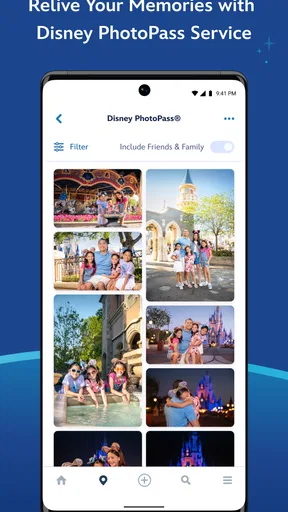
- Disney PhotoPass photos can be linked and viewed in one convenient place.
- Personalized recommendations help organize plans around your interests.
- Resort hotel guests can manage dining and activity reservations from the app.
Limitations of My Disney Experience
- Many useful features require an active internet connection in the parks.
- Some reservations and changes may be difficult during busy periods.
- The app can use significant battery power throughout a full park day.
- Frequent notifications may feel excessive if alerts are not customized.
- Certain features work best for guests staying at Disney Resort hotels.
Other Releases by Disney
View All
Disney+
Entertainment4.4

Hulu: Stream TV shows & movies
Entertainment4.5

ESPN
Sports4.5

ESPN Fantasy Sports
Sports4.6
Similar Picks in This Category
View All
Google Maps
Google LLC3.4

Google Maps Go
Google LLC4.1

Booking.com: Hotels & Travel
Booking.com Hotels & Vacation Rentals4.8

Google Earth
Google LLC3.8

Skyscanner Flights Hotels Cars
Skyscanner Ltd4.8

trivago: Compare hotel prices
trivago N.V.4.4
Frequently Asked Questions
What is My Disney Experience used for?
My Disney Experience is the official planning and companion app for Walt Disney World Resort in Florida. After signing in with a Disney account, you can manage reservations, view park maps, check attraction wait times, make or modify dining plans, browse entertainment schedules, and organize parts of your visit from one place. It is most useful before and during your trip, although some features depend on your tickets, reservations, and location.
Is My Disney Experience free to download and use?
Yes, My Disney Experience is generally free to download from the App Store and Google Play. However, downloading the app does not include park admission, hotel stays, dining reservations, Lightning Lane purchases, or other Disney services. Some functions also require an internet connection and an eligible Disney account. Mobile data charges may apply, particularly when using interactive maps, live wait times, or other location-based features inside the parks.
Can I use the app to buy tickets and make reservations?
The app can help guests explore ticket options and manage many aspects of a Walt Disney World visit, including linking tickets, viewing resort reservations, booking dining, and handling eligible attraction-planning options. Availability can vary according to your account, travel dates, ticket type, and current Disney policies. Before relying on a booking, carefully review the date, party members, cancellation rules, and any additional charge shown during checkout.
Does My Disney Experience work without an internet connection?
My Disney Experience is designed to work best with a reliable mobile or Wi-Fi connection. Certain information may remain available after it has loaded, but live wait times, current park details, reservations, mobile ordering, navigation updates, and many account actions normally require internet access. It is wise to charge your phone, download the latest version before arriving, and use park Wi-Fi or mobile data when necessary, while keeping screenshots of important confirmations as a backup.
Is My Disney Experience easy to use during a park visit?
The app offers a large collection of useful tools, but first-time users may need a little time to become familiar with its menus and terminology. The home screen, map, search tools, and reservation sections are practical, while busy periods can make information feel overwhelming. Linking everyone in your party to the correct account is especially important. I recommend setting up profiles, tickets, hotel details, and dining plans before entering the park so the app is quicker to use.
